
Search results
PNWPhotos.com a friendly and growing community of photographers with an interest in the Pacific Northwest region.
We feature a Photography Discussion Forum and Pacific Northwest Photo Gallery. It's a fun and friendly place to talk with other photographers, ask questions, share you knowledge, view and post photos and more!
Affiliate Disclosure: We may receive a commision from some of the links and ads shown on this website (Learn More Here)
-

Best Free Tools for Background Removal (No Download Needed)
I’ve been looking for some solid background removal tools that don’t require downloading software, just quick, browser-based solutions that actually work well. Came across this blog post the other day that lists a bunch of well-known free background removers, including ones I’ve used before...- orgloge
- Thread
- photo editing
- Replies: 0
- Forum: Tips and Techniques
-
Comment by 'orgloge' in media 'Cape Arago Lighthouse'
You really captured the power of the waves and the drama of that coastline, makes the lighthouse look even more iconic. I’ve never been out to Cape Arago, but this makes me want to plan a trip. The lighting and composition are spot on too. Nicely done!- orgloge
- Gallery comment
-
Comment by 'orgloge' in media 'Rainbow'
This is absolutely magical. The way the sunlight hits the mist with that rainbow peeking through, feels like something out of a movie. Was this taken right after a storm? The timing is perfect.- orgloge
- Gallery comment
-
Comment by 'orgloge' in media 'Emerald City'
The colors are unreal, those yellows against the green and that deep blue of the mountains... just incredible. Gives off that “Emerald City” vibe. Where exactly was this taken? I’d love to see this in person one day.- orgloge
- Gallery comment
-
Comment by 'orgloge' in media 'Seabeck Sunset'
Absolutely stunning colors! The layers of blue in the mountains against that soft pink sky are just perfect. Really peaceful vibe, beautifully captured.- orgloge
- Gallery comment
-
Comment by 'orgloge' in media 'Armor'
Love the textures and how weathered it looks up close. Anyone else into quirky metal sculptures like this?- orgloge
- Gallery comment
-
What are the best browser-based photo editing tools for advanced edits (without downloading Photoshop)?
Photopea - It's a lot like Photoshop regarding how it looks and what it can do. You can open PSD files and work with layers and masks. It even has cool tools like the clone stamp and the brilliant selection. The best part is that it runs right in your browser, and you can use it for free!- orgloge
- Post #2
- Forum: Tips and Techniques
-
A World in Color: Magnum Photos is revealing hidden treasures from its archive
I really like how this piece illuminates the difference between Magnum's early work in black-and-white photojournalism and the hidden gems in its color library. It's like starting a fresh chapter in the agency's storytelling. Plus, it's super interesting to see how they’re bringing old images...- orgloge
- Post #2
- Forum: Shows and Competitions
-
RAW vs. Jpeg: You May Be Surprised by What's Best for You! (VIDEO)
I usually go for RAW when I plan to edit my photos later. But for casual shots or when I want to share quickly, JPEG works just fine. The most challenging part for me was figuring out how to process RAW photos smoothly without slowing me down.- orgloge
- Post #2
- Forum: Photography 101 - Photo Basics
-
How to Use Adobe's Amazing AI-Based Adaptive Color Profile (VIDEO)
Adaptive Color Profile can simplify the process, especially with RAW files. The side-by-side comparison shows how powerful the AI-based edits are. Thanks to Charles for the clear walkthrough and to Shutterbug for sharing this!- orgloge
- Post #2
- Forum: Adobe Photoshop
-
Limited Edition Polar White Color GoPro Hero 13 Black
Any idea if the white finish is more scratch-resistant or just aesthetic? Either way, this would look awesome on a snowy mountain shoot- orgloge
- Post #2
- Forum: News and Product Announcements
-
Capturing the Perfect Action Shot: Tips for Sports and Event Photography
Capturing sports and events is all about having a sharp eye, quick reflexes, and the correct settings to catch the action at the right moment. Whether you’re shooting high school football marathons, concerts, or crazy extreme sports, getting that perfect shot can be challenging. What are your...- orgloge
- Thread
- action shots behind the lens event photography low light photography photo gear pnw photography pro photography sports photography
- Replies: 0
- Forum: Sports and Event Photography
-
Touch the Sun
I love how vibrant the colors are—especially the deep oranges and reds you captured in the sunsets. You clearly have an eye for composition, too. The silhouettes of the trees and sailboat add a artistic touch. Thanks so much for sharing these; they brightened my day!- orgloge
- Post #6
- Forum: Nature, Landscapes and Scenic Photography
-
Comment by 'orgloge' in media 'Gray Squirrel'
What camera and lens were used to capture this?- orgloge
- Gallery comment
-
Must-Have Gear for Sports Photography
Essential Equipment for Sports Photography Here are some key items I’ve found to be absolute game-changers: DSLR or Mirrorless Cameras: Fast autofocus and high frame rates are essential. Models like the Canon R6 Mark II or Sony A1 are popular among pros. Telephoto Lenses: 70-200mm f/2.8 or...- orgloge
- Thread
- photography sports
- Replies: 1
- Forum: Sports and Event Photography
-
Level Up Your Sports Photography: 11 Pro Editing Tips
I wanted to share an excellent article shared by PathEdits that provides some fantastic editing tips to enhance your sports photos. They cover everything from basic adjustments to advanced techniques, all in an easy-to-follow format...- orgloge
- Thread
- editing photo editing pro tips sports
- Replies: 0
- Forum: The f Stops Here - Casual Conversations, Off Topic
-
Comment by 'orgloge' in media 'FXE 4057 (SD70ACe)'
This infuses the image with energy and motion. The leading lines of the rails are another way the photographer draws attention to the train.- orgloge
- Gallery comment
-
Comment by 'orgloge' in media 'Taking A Break From Today's Problems'
The ducks are in crisp focus, but the blurring background helps draw attention to them. The photograph has vivid, rich colors and a harmonious arrangement.- orgloge
- Gallery comment
-
Comment by 'orgloge' in media 'Private Fireworks'
All the world's a stage at night- orgloge
- Gallery comment
-
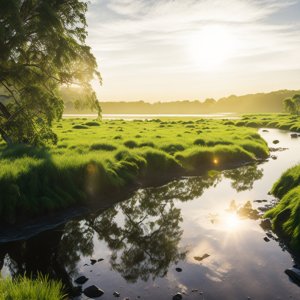
OrgLoge_A_green_land_grows_on_the_rivers_bank_the_s_1.jpg
A green land on the rivers bank- orgloge
- Media item
- natural river bank riverfront sunset
- Comments: 0
- Media category: Sunrises and Sunsets